Canva Book Cover Templates: Launch Your Journal Business
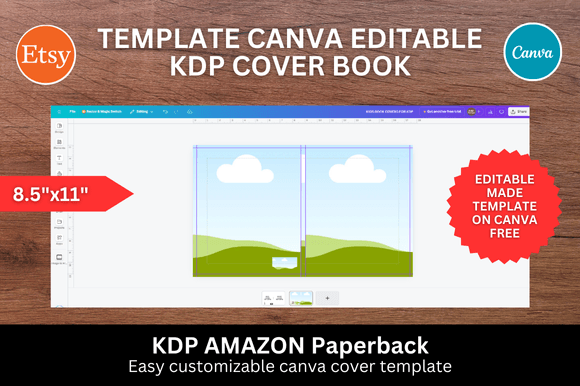
In the world of self-publishing, your book cover is the single most important sales tool you possess. It is the handshake, the first impression, and the deciding factor for millions of potential readers scrolling through Amazon. For creators, entrepreneurs, and hobbyists looking to enter the journaling market, the barrier to entry used to be hiring expensive graphic designers or mastering complex software like Adobe InDesign. Today, the landscape has shifted entirely thanks to Canva Book Cover Templates. These assets have democratized design, allowing anyone with a vision to produce professional-grade publishing materials. Specifically, floral and nature-inspired designs continue to dominate the market, offering a sense of calm, creativity, and organic beauty that resonates deeply with journaling audiences.
The Anatomy of Modern Journal Design
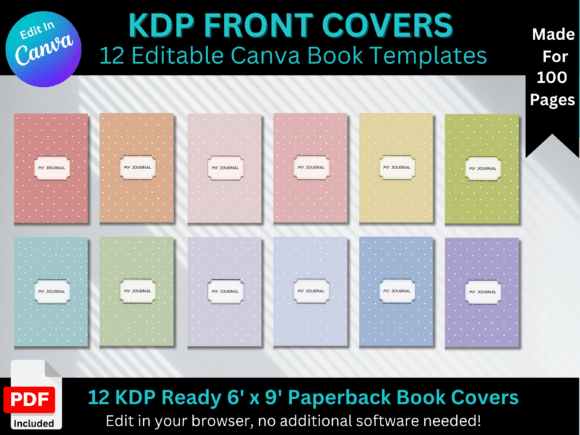
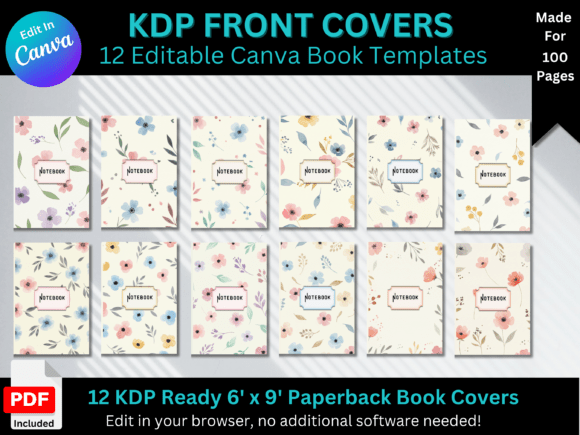
When we look at a set like the 📓 12 Floral Journal Front Cover Templates, we aren't just looking at pretty pictures; we are looking at strategic design assets. These templates are built on a 6 x 9 inch standard, which is the industry standard for trade paperbacks and journals on Amazon KDP. The visual personality of these covers typically balances modern typography with organic elements. You will often find a mix of sans serif font choices for the main titles to ensure readability at thumbnail size, paired with delicate script font or handwritten font accents to evoke a personal, intimate feel.
The appeal lies in the "editable nature" of these files. A static PDF is useful, but a Canva link provides true creative freedom. This flexibility allows you to adjust the kerning (the space between letters), swap out a serif font for a bold display option, or change the color palette of the floral elements to match a specific seasonal trend. Whether you are creating a gratitude journal, a daily planner, or a specialized notebook for a niche market, the ability to manipulate these design assets ensures your final product feels unique rather than generic.
Strategic Applications for Creators and Businesses
The utility of high-quality Canva templates extends far beyond simple vanity projects. For the savvy entrepreneur or content creator, these covers are the foundation of a product line. Consider the following real-world applications:
- Amazon KDP Publishing: The primary use case. These templates come "KDP ready," meaning the dimensions and bleed settings are already optimized. This removes the technical headaches of upload errors, allowing you to focus on marketing and interior design.
- Digital Products and Lead Magnets: Bloggers and marketers can use these templates to create "digital covers" for PDF guides, eBooks, or free downloads offered to email subscribers. A professional cover increases the perceived value of a free resource.
- Brand Identity and Cohesion: Small business owners can utilize the floral motifs to build a brand identity. By using the same font pairings and color schemes found on the book cover across social media graphics and web design elements, you create a cohesive visual language.
- Custom Merchandise: Crafters and hobbyists can adapt these designs for packaging design, wrapping paper, or even printable wall art that complements the journal series.
Mastering Typography and Visual Hierarchy
One of the most critical aspects of editorial design is the hierarchy of information. A well-designed Canva template guides the viewer's eye from the main title to the subtitle, and finally to the author's name. When you edit these templates, pay close attention to how the fonts interact. A common mistake is pairing two fonts that are too similar, which creates visual tension. Instead, aim for contrast. If the template utilizes a bold, geometric display font, try pairing it with a light, airy sans-serif for the subtitle.
Readability is paramount, especially in logo design and cover art. While a complex premium font might look beautiful on a desktop screen, it can become illegible when shrunk down to a thumbnail on a mobile device. Always test your designs at 100% zoom and then zoom out to the size of a postage stamp. If the title is unreadable at a small size, the design fails its primary function. The floral elements should frame the text, not compete with it. Use the "send to back" function in Canva to ensure your typography sits cleanly on top of the botanical illustrations.
Evaluating Project Fit and Licensing
Before committing to a specific set of templates, you must evaluate the project fit. Is the style "modern creative" or "vintage rustic"? The floral templates described here lean toward a modern, clean aesthetic, making them ideal for contemporary lifestyle brands, wellness journals, and creative font showcases. They might not be the best fit for a gritty, industrial thriller novel, but they are perfect for the booming self-care market.
Furthermore, understanding the commercial aspect is vital. When you purchase a bundle that includes "Free KDP Interiors," you are essentially getting a turnkey business solution. However, always review the licensing. Canva’s free elements have different usage rights than Pro elements. A good template provider will clarify which elements are used so you can avoid copyright strikes. These templates serve as commercial font and graphic vehicles, allowing you to sell the finished product (the journal) without legal ambiguity, provided you adhere to the license terms.
From Template to Trend: The Creative Workflow
Turning a template into a bestseller requires a shift in mindset. You are not just filling in blanks; you are curating an experience. Start by researching your niche. If you are designing a "Gardening Journal," the floral elements are perfect, but you might want to adjust the colors to reflect earth tones—sage greens, terracotta, and soft ochres. Use Canva’s color picker to sample colors from the floral illustrations to ensure your text colors harmonize with the background.
Don't be afraid to mix and match. If you have a bundle of 12 templates, you can take the typography layout from one and the background texture from another. This is the beauty of modern typography workflows. You can create a series of books that look related but distinct, encouraging repeat customers. For instance, a "Morning Routine" journal and an "Evening Reflection" journal can share the same floral DNA but use different accent colors or font pairing styles to differentiate them.
The Technical Advantage of Canva
For those who are not tech-savvy, the user interface of Canva is a lifesaver. Unlike traditional graphic design software, it is intuitive and drag-and-drop. This accessibility means that a marketer can create a professional cover without calling in a favor from the design department. The ability to export directly to PDF Print format ensures that the resolution remains high (300 DPI), which is a requirement for Amazon KDP to prevent pixelation.
Ultimately, using Canva Book Cover Templates is about working smarter, not harder. It allows you to leverage professional design principles—balance, contrast, alignment, and proximity—without having to build them from scratch. Whether you are a blogger looking to compile your posts into a book, or a publisher scaling up a production line of low-content books, these floral templates provide the aesthetic quality and technical reliability you need to succeed in a crowded marketplace. Happy creating and journaling!