10 Canva Resume & Cover Letter Templates
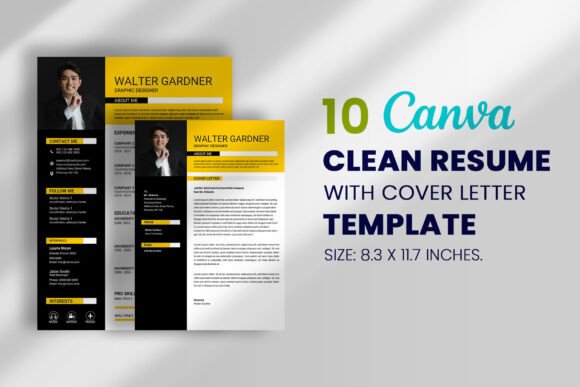
When you are hunting for a job, your resume is not just a piece of paper; it is the opening argument for your professional brand. In a crowded market, relying on the default templates in Microsoft Word is often a fast track to the "no" pile. That is why having a solid toolkit of design assets matters. We are looking at a specific collection of 10 Canva Resume & Cover Letter Templates designed to bridge the gap between high-end graphic design and user-friendly customization.
The Power of Modern Typography in Job Hunting
The visual personality of these templates leans heavily into modern typography. We are not looking at stuffy, outdated serif fonts from the 1990s here. Instead, the collection utilizes clean sans serif fonts and strategic layout choices that guide the recruiter’s eye exactly where it needs to go. This is crucial for brand identity. Even if you are not a corporation, you are a brand when you apply for a job. These templates act as a display font for your skills, presenting your experience in a way that feels sleek, professional, and current.
The visual hierarchy is built into the design. You will notice how the layout separates your contact information, your professional summary, and your work history using whitespace and design elements rather than cluttered lines. This creates a breathing room that makes the document easier to scan. In editorial design, we know that readers scan before they read; these resumes are optimized for that behavior.
Customization: Beyond Simple Text Editing
One of the standout features of this Canva collection is the ease of editing. You are not just changing text; you are engaging with a full design system. Because these are Canva editable files, you have access to the platform's vast library of design elements to tweak the look. If the graphic style does not quite match your industry, you can swap out icons or adjust the color palette in seconds.
For those worried about photos, the templates utilize Canva frames. This is a practical feature for digital files. You simply drag and drop your headshot into the frame set, and Canva handles the cropping. This is particularly useful for web design principles applied to print—ensuring your image resolution and aspect ratio remain perfect without manual resizing.
Here is how the customization process works in practice:
- After your purchase, you receive a PDF with a direct link.
- Sign in or create a free Canva account.
- Click the link to open the template in the editor.
- Customize fonts, colors, and layouts to fit your personal style.
Strategic Applications for Entrepreneurs and Creatives
While the primary use case is employment, the versatility of these Canva design files extends much further. If you are a small business owner or entrepreneur, a well-designed one-page bio is an essential part of your pitch deck. It functions similarly to a resume but focuses on your business history and achievements.
Consider the following scenarios where this collection shines:
- Freelancers: Use the cover letter templates to introduce yourself to new clients, matching the style of your invoice for a cohesive brand identity.
- Marketers: Create a "Resume" of your past campaign successes to present to potential partners.
- Content Creators: A media kit is essentially a resume for your audience stats. These layouts provide the perfect graphic structure for that data.
The ability to save these as high-quality PDFs ensures that whether you are emailing them or printing them for an interview, the professional look remains intact. The size is optimized for standard printing (8.3 x 11.7 inches), ensuring no awkward cropping at the print shop.
Ensuring Readability and Professional Polish
As a designer, I often see templates that look beautiful but fail at function. The text is too small, or the contrast is too low. This collection, however, prioritizes readability. The font pairing choices are sensible—usually combining a bold sans serif font for headers with a highly legible typeface for body text. This ensures that your contact details and key achievements are instantly accessible.
Furthermore, the commercial license provided is a significant benefit. You can use these designs for your own personal job search or for creating resumes for clients if you are a career coach or virtual assistant. However, the terms of use are clear: sharing the source template file itself is prohibited. This protects the integrity of the design assets you purchased.
Ultimately, this Canva business toolkit is about saving time and energy. Instead of struggling with alignment issues in a word processor, you are leveraging Canva graphic tools to drop your information into a pre-validated structure. It is a practical solution for anyone who wants a job-winning resume without hiring a bespoke designer.
Ready to upgrade your application materials? You can explore the full collection here and start customizing your future today.